Claude has no button that saves one chat as a Markdown or PDF file. You can still get a chat out: with Claude's own data export, a shared chat, your browser's print window, copy and paste, or a browser add-on.
We read Anthropic's help pages on 24 November 2026. Here is what each way gives you.
1. Claude's own "Export data"
By Anthropic's help page on exporting your data, individual users export their user information and chat history from Settings > Privacy, with the Export data button, on the web app or Claude Desktop. It is not possible from Claude for iOS or Android.
What you get, by that page:
- A download link by email, to the address on your account. There may be a short delay while the export is made.
- You must be signed in to download it. The link expires 24 hours after it is made and may work only once, so download the file straight away.
- Your conversation data and the user data for your account. It does not include the original files you uploaded.
- On Team and Enterprise plans, you can export your own chats only after an owner turns this on.
So it is a copy of the whole account, not a Markdown or PDF file of the chat you have open. Anthropic's page does not say which file format the chats come in.
2. A shared chat
The Share button at the top right of a chat makes a link. By Anthropic's sharing page, anyone with the link can view a snapshot of the chat, including any artifacts, as it was when you shared it. Files you attached are not in the snapshot. On Team and Enterprise plans you can share only with members of your organization. It is a web address, not a file.
3. Print the page to PDF
Open the chat on a computer, press Ctrl+P (Cmd+P on a Mac) and choose "Save to PDF" (Firefox) or "Save as PDF" (Chrome). This needs nothing extra.
The print window prints the page as it is, with the side bar and buttons around the chat. On a long chat, check that the PDF starts at your first message and has every reply before you rely on it.
4. Copy and paste into a Markdown file
Select the messages, copy, and paste into a text editor, then save the file with a .md ending. This is fine for one answer. A plain copy and paste may not keep the Markdown marks for headings, lists, tables and code, so check the file before you rely on it.
5. Threadkeep, an add-on for Firefox
Threadkeep is a free add-on we make. Version 2.0 is on Firefox; the Chrome update is in review. It saves the Claude chat you have open as a Markdown, text, JSON, PDF or Word file, or to a library in your browser.
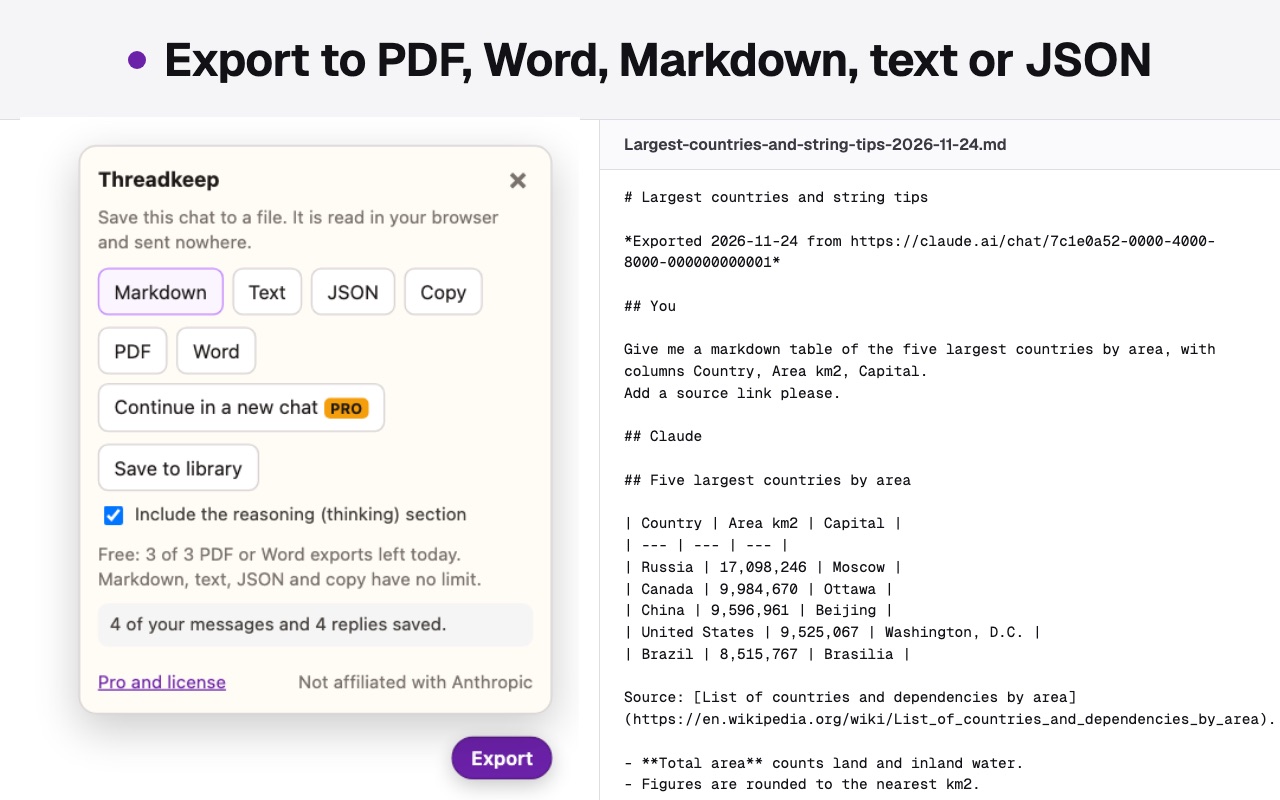
Threadkeep 2.0.0 on a made-up test page built like a Claude chat, with the Markdown file it saved.
- Install Threadkeep from Firefox Add-ons.
- Open the chat on claude.ai.
- Click the Threadkeep button in Firefox's toolbar. On Claude it asks for nothing at install, so the first click on a tab opens the panel there. To have its purple Export button on Claude every time, click Show Threadkeep on claude.ai every time in the panel, or turn Claude on in the add-on's settings. Firefox asks you to allow the site.
- The first time, a short notice says what is read. Nothing is read until you click I agree.
- Click Markdown. Or Text, JSON, Copy, PDF or Word.
- The panel says how many of your messages and how many replies it saved. If it warns that something may be missing, run it again.
What you get:
- Markdown downloads a .md file with the chat's title, the export date and the chat's address at the top, then each message under "You" or "Claude". Code blocks keep their indentation, tables stay tables, and lists and links stay.
- Copy puts the same Markdown on the clipboard.
- PDF opens the chat in a new tab with Firefox's print window. Choose "Save to PDF". The text is real text you can select and search. If the print window does not open, click Save as PDF at the top of that tab.
- Word downloads a .doc file that Word opens (an HTML .doc file, not a .docx).
- On a long chat Threadkeep scrolls the chat once, after your click, so the page shows the earlier messages. Do not scroll while it reads.
To keep the chat as well, click Save to library. See how the library works.
Limits
- Artifacts: Threadkeep does not save the content of Claude artifacts. It keeps a title line where each one was. To keep an artifact's content, copy or download it from Claude's side panel.
- Not saved either: pictures (a picture stays as a short line, or as a link in Markdown) and uploaded files.
- Free: Markdown, text, JSON and copy have no limit. PDF and Word are 3 exports a day. Pro removes that limit and costs USD 4.99 a month, USD 29 a year or USD 59 once, for one browser. You get it from Pro and license in the panel.
- Claude works in Threadkeep 2.0.0, which is on Firefox. The Chrome Web Store has version 1.2.0 today, which does not work on Claude. The Chrome update to 2.0.0 is in review.
- It saves the chat you have open, one at a time. For every chat at once, use Claude's "Export data".
- Threadkeep is made by SKILLMERC. It is not made by, endorsed by or affiliated with Anthropic. Claude is a trademark of Anthropic, PBC.
Questions
Is the chat uploaded anywhere? No. The chat is read in your browser and saved to your computer, or to the library in your browser. Threadkeep needs no account and has no analytics and no ads. The only thing it ever sends is a Pro license key check to Freemius, our payment and licensing provider, and only if you buy Pro. Firefox asks you first. No chat text is in it.
Does Threadkeep use my Claude login? It reads the page you already have open. It does not use your login to fetch anything in the background.
Threadkeep for Firefox and Chrome
Free extension: saves the AI chat you have open as Markdown, text, JSON, PDF or Word. Version 2.0 on Firefox adds a library you can search. The chat stays in your browser.
More guides
- How to export a DeepSeek chat to PDF, Word or Markdown (free ways and a Firefox add-on)
- DeepSeek "Length limit reached": how to continue a long chat in a new chat
- How to export a ChatGPT conversation to PDF or Word (free ways and a browser add-on)
- How to save Gemini chats: Export to Docs, Google Takeout, PDF and Markdown
- How to keep a searchable library of your ChatGPT, Claude, Gemini and DeepSeek chats